How make a fake prank virus for fun virusforfun

By tnvrstar
Make a prank virus only for fun
One of my follower asked me a question to make a virus. So, i have decided to make a hub on this topic. This is the easiest way you can make virus to make fun with your friends. The process is very easy, it will take just 1 minute to make the virus. Actually it is not a virus, It is a fake virus. It will just open up Windows CMD box one after another so that the user will have no choice to shut the computer and yes he will get shocked thinking whether he has damaged his computer or not.
Once i made this so called fake virus on my friends PC and told him to open the file. When he clicked suddenly the Box started to pop one by another and he was so confused , I told him it's a virus and he was so afraid that i can't explain. Later when he knew it wasn't a virus he laughed about it. But be careful your friend may get angry ;)
Caution: Please don't do this prank, again and again in the same computer, it may corrupt your window's system file
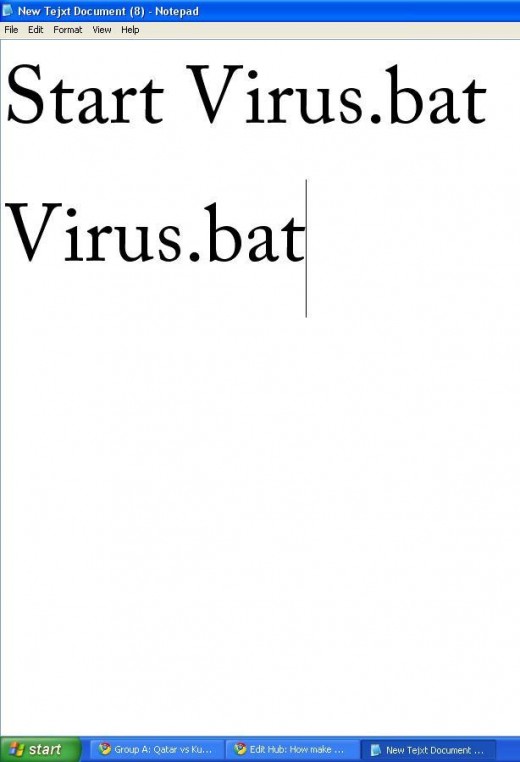
The process
At first click Start and open Notepad from the menu or from the all programs.
In the notepad type Start virus.bat then press enter
In the second line type Virus.bat
Now click save as in the name give the name Virus.bat
The name should be exactly virus.bat . That's it your fake virus is ready for action, have fun, please don't misuse it. Please do comment and rate the hub. Thank you
* I have started a new blog and trying to write some useful tips for readers, you can visit my blog if you want, click here to visit my blog
want to read more articles of mine then check the following
YouTube revenue sharing program
Comments
I´ll try it just for fun...xox
cool its wrking...
fake virus it is possible to apply to yahoo messenger?
can i send it as an attachment in yahoo mail , rocketmail ,googlemail ,msn etc.??? and oh can i transfer it to my friend by facebook???
very fantastic.
loseeeeeeerrrrrrrrrrrrrrrr
I am new and not tried yet but hope it will work
fanatastick
nice
how to stop when it is activated?
you can't stop it! Just hold on your power button and boot your computer.
Its very good but it creates problem for Me.
I think there is a virus in my computer, When I am working in some folder suddenly it try to open all the files of the folder and after a minute it is automatically deactivated.
Please suggest me what to do?
Thanks for your tricks
@Manish , yes it seems you have got a real viruses in your computer. Once all of your files are infected by the virus it is very difficult to fix it like before. I recommend you to backup all of your important files in an external hard disk then format your computer and install a better anti-virus so that you don't face the problem again.
If you don't want to format you could try some reputable anti-virus to scan your computer and remove/quarantine the virus. If it does not work then you must format your computer. I don't see any other good options.
Wow...................................!!!!
datz nyc man keep it up. Ur trickz r amazing.
fantastic i like it
if there is any new tricks mail me through
purepradeep@gmail.com
awsm...its wrking....!!
Its too gud... Superb............. :)
kya hum ise facebook par kise frnd ke id par bhej sakte h???
COOOOOOOOOOOOOOOOL.....
amazing!
i feared a lot .........but the trick is cool
khatarnaak
ver niceee dear
Thanxxx
but how can we stop it without shut our pc ?
superb
itssssssssssss awesome......
you said that hold on power button and boot your computer means what?
yr ye virus kam kya krta hai.
ye to bta do mai ise bna du or koi problm ho jaye.
Prashant Gupta 16 months ago
Nice!